Showing posts with label iron man HUD. Show all posts

Wednesday, April 1, 2015

Iron Man UI: complete!!!!!


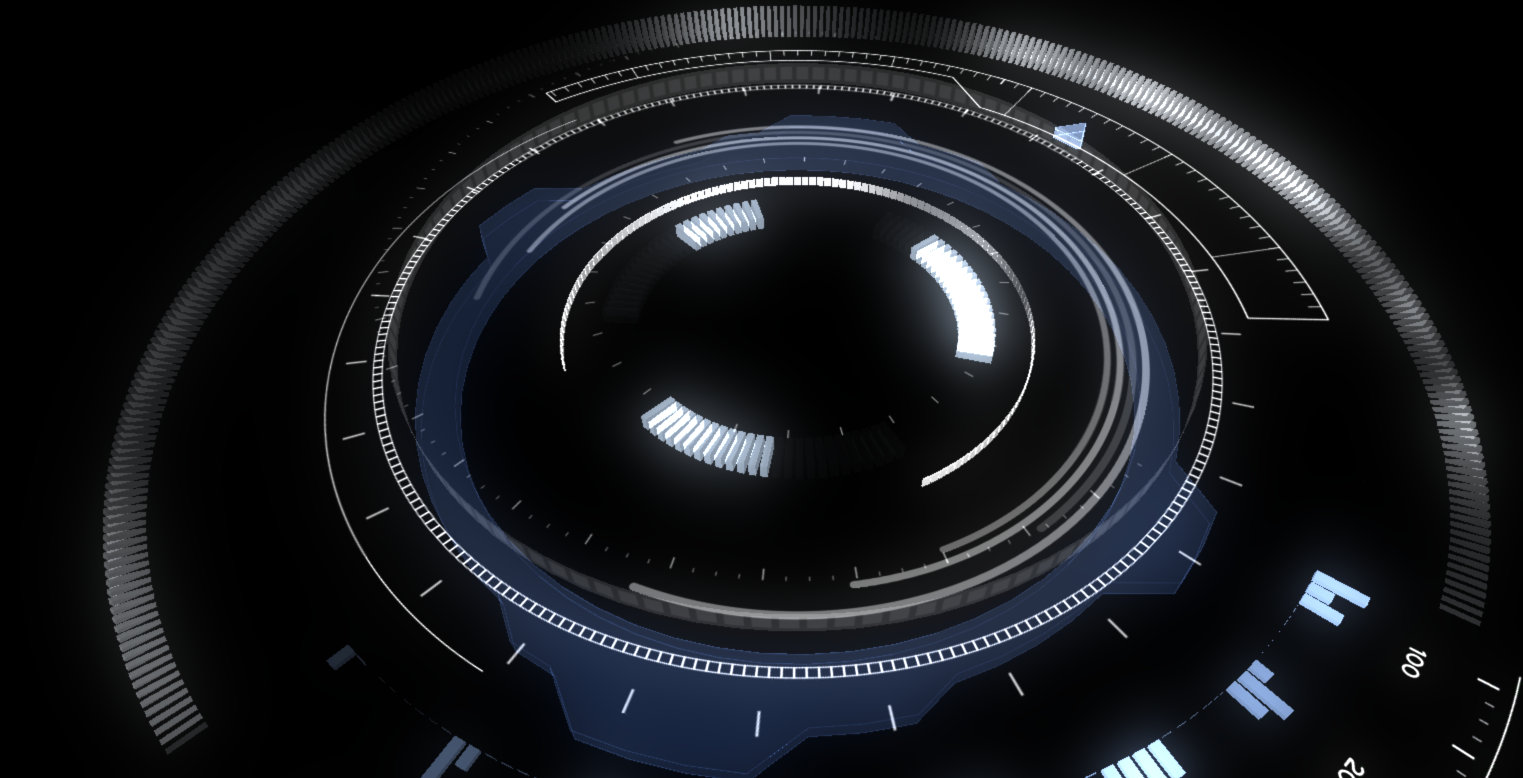
The Iron Man UI inspired visualization is complete!  You can check out the complete video above which is accompanied by my latest single, Renewal, which is available on CDBaby, Amazon, and iTunes!

Now to talk about some of the movement of the visualization through space.  All of the different visual elements are linked to a master node which can move the complete structure through space.  You'll notice this motion occurs for the first time around the 0:30 mark.
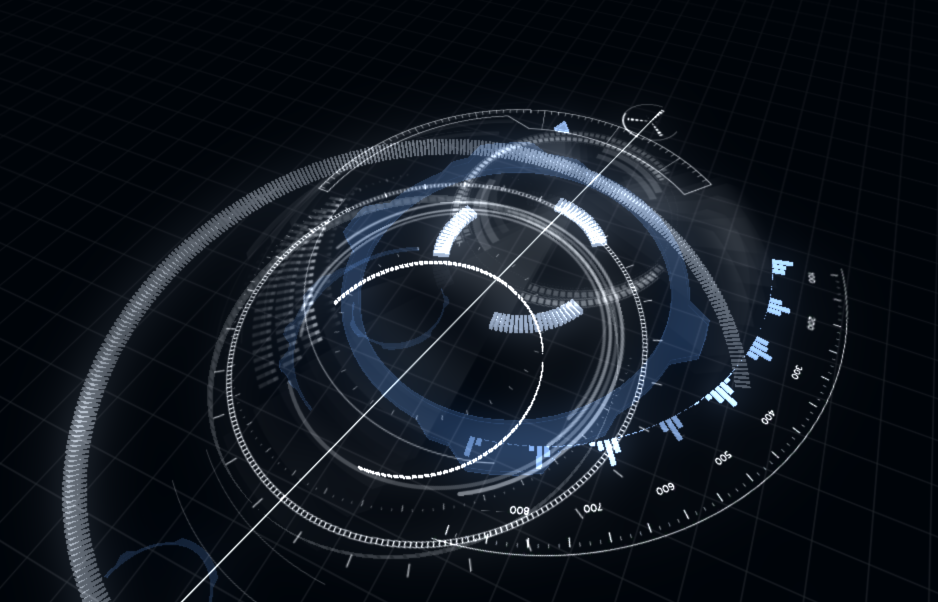

I put different dampening ratios on all the different parts so everything moves to a new location but not all at the same time.  This was mainly to create more visual interest in the movement.


You'll notice in the image above I've circled in red the two dials which control how or when a global motion will occur. This is one area I'm looking to explore much further in future visualizations but I'll describe that in just a bit.  For this, a threshold and timer determine when the entire structure moves and both of these variables are determined by audio parameters.  Putting controls in place allows you to override or help make this event happen to some extent. 

The image above shows the controls I've put in place for this visualization.  I've elected to keep them very simple on this one.  Some visualizations I create have very complex controls with lots of presets.  It often depends on the client and the performance as to how much flexibility they would like.  Here is an example of a more complex setup.
Each visual element I create often has numerous components that can be scripted to the UI control in Max/MSP.  I typically create presets which allow you to quickly move through lots of complex settings.  This is very similar to lighting and audio control boards you would find in live performance venues.  Technicians will dial in lighting and sound settings, create cues or presets, and build all of the events during rehearsals.  When the big performance happens, it's a much simpler process of moving through presets or cues at the correct timings.  My system mimics this procedure.  All of these controls/presets can also be further simplified for a mobile interface.  You can sit in the audience and run the entire visualization from your smartphone if you wanted to.

Back to the Iron Man UI controls, I have a hue shifter so you can shift the hue on all of the visuals from red to green or blue.  Bloom intensity lets you control how much bloom is applied.  There is a subtle adjustment on this which reacts to the amplitude of the audio.  This control allows for larger changes with the effect.  Height controls how much up and down motion the entire structure will move.  Setting this to 0 keeps everything at the default height.  Increasing this will expose the entire structure to an audio parameter which moves everything up or down.


As mentioned in previous postings, everything is driven by the audio.  The additional controls just allow for greater motions or an overarching control on some of these audio driven systems.  The computer handles all the minute analysis details and movement while you get to make the broad sweeping changes.

I noted earlier about future explorations in my visualizations and where I'm looking to go next.  Music has lots of patterns, themes, and motifs that often build on each other and develop.  I want to explore these further within the realm of video game combos.  Lots of video games utilize a system of combos.  Typically someone might button mash or go through a sequence of buttons a bunch of times to create a 25 hit combo for example in a fighting game.  RPG's, platformers, and other genres of video games have utilized similar concepts as well. Now what if musical structures could create their own combos within a music visualization system? That exploration could easily take another 2 years and another Master's degree to investigate.  In my next project, I'll at least begin to scratch the surface of combining those principals and we'll see what happens.

This is also my last time working with Unity 3.5.  Going forward, I will be migrating all work to Unity 5.0.  Stay tuned for the next visualization.  I also have some small tangential explorations from this visualization I'll post about too!  Can't wait to share my next developments.  For now, I hope you enjoyed this one.


Sunday, March 22, 2015

Iron Man UI: Almost there.... plus a new song called "Renewal"

It's been a couple weeks since I last posted anything about this project.  It's almost done.  I have a bunch of additions.  Last time I mentioned the need for one big unifying piece to help tie all the separate elements.  Here is a quick image of what that looks like:
This consists of a bulls eye element in the middle which can rotate independently from the rest of the parts.  Since there is so much other movement going on in the visualization, I elected to keep this element completely static.  To represent the music, it has a texture ring which emanates outwards exposing parts of the complete design.   The tutorial in my previous post demonstrates how to do this effect.

Finally, I added a few arcs that rise and sink around the central column.

There are a few more finishing touches like showing how this whole thing moves through space which I'll get to in my next post.

I got a bit side tracked because I had to compose a new piece of music for this animation. The piece of music is all finished and should go live later this week.  For now, you can check out a snippet of it in this video.  It's called "Renewal"


Much more awesomeness to come so stay tuned....

Thursday, March 12, 2015

Creating a 2 UV set shader in Unity

Doing a quick deviation from my documentation on the Iron Man music visualization.  Figured I'd put up a quick tutorial on creating a shader that utilizes two UV sets on a mesh.  I had trouble finding a good example of this on the web.  Feel free to post in the comments if there is a good one someone knows about that I might have missed.  The software I'm using for the following tutorial is Unity 3, (pro or free version) Autodesk Maya (any version), and the Strumpy shader editor for Unity. 

This should work without any issue in Unity 4 and Unity 5.  Once I complete this project, I'll re-explore this in Unity 5 to confirm.  Anyone is welcome to comment as well to confirm this works in 5.

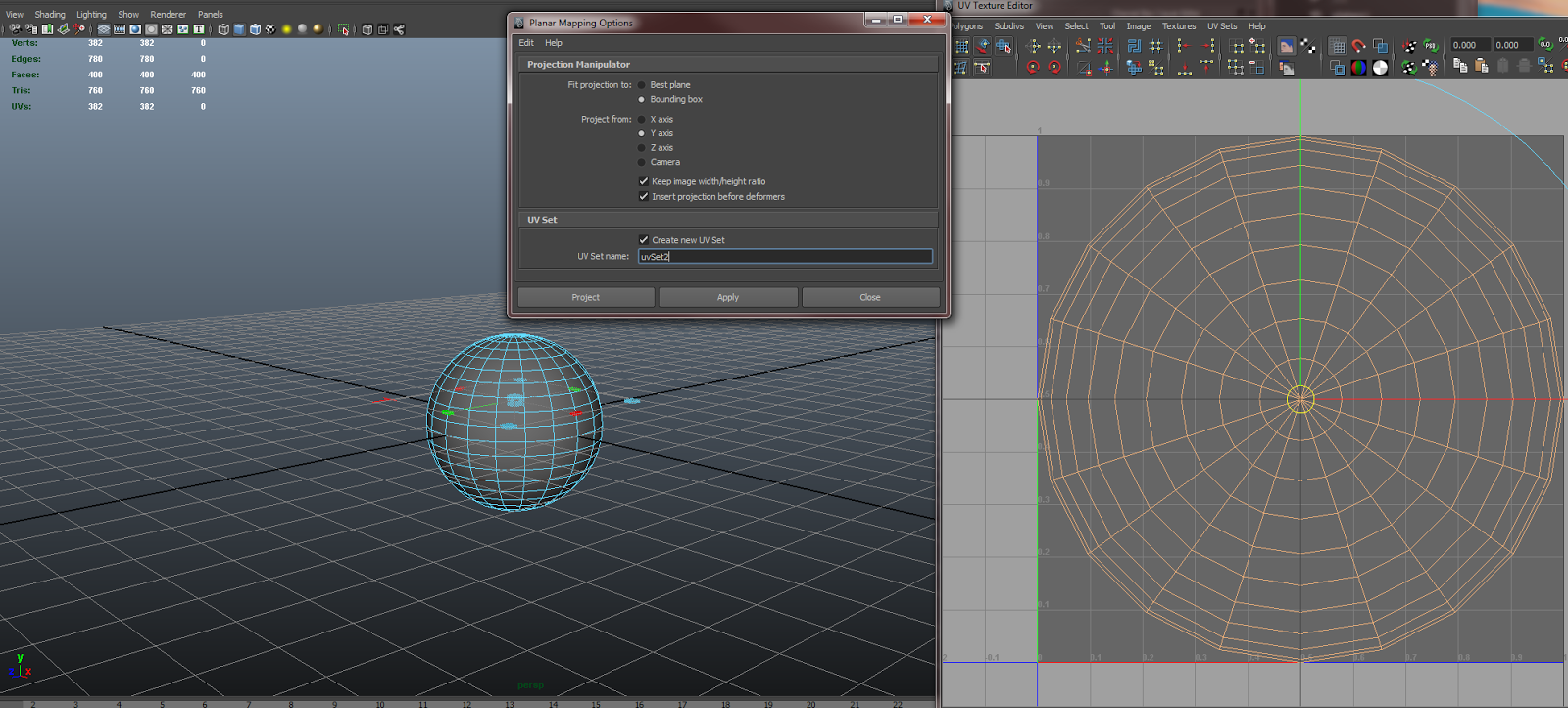
1. Create a sphere in Maya


In the options box, make sure Sawtooth at poles is selected for texture mapping
This will create a UV layout as shown in the UV texture editor to the right of the image.

2. Create a secondary UV set.  


For this step, I used a planar projection on the y-axis.  Make sure you have Create new UV Set checked and designate a new name

3.  Import the new asset into Unity


I've included a screen shot of my settings.  Typically Unity uses the second UV set for light mapping purposes.  I have Swap UVs and Generate Lightmap UVs unchecked so what I created in Maya matches what gets imported to Unity

4. Strumpy shader graph setup


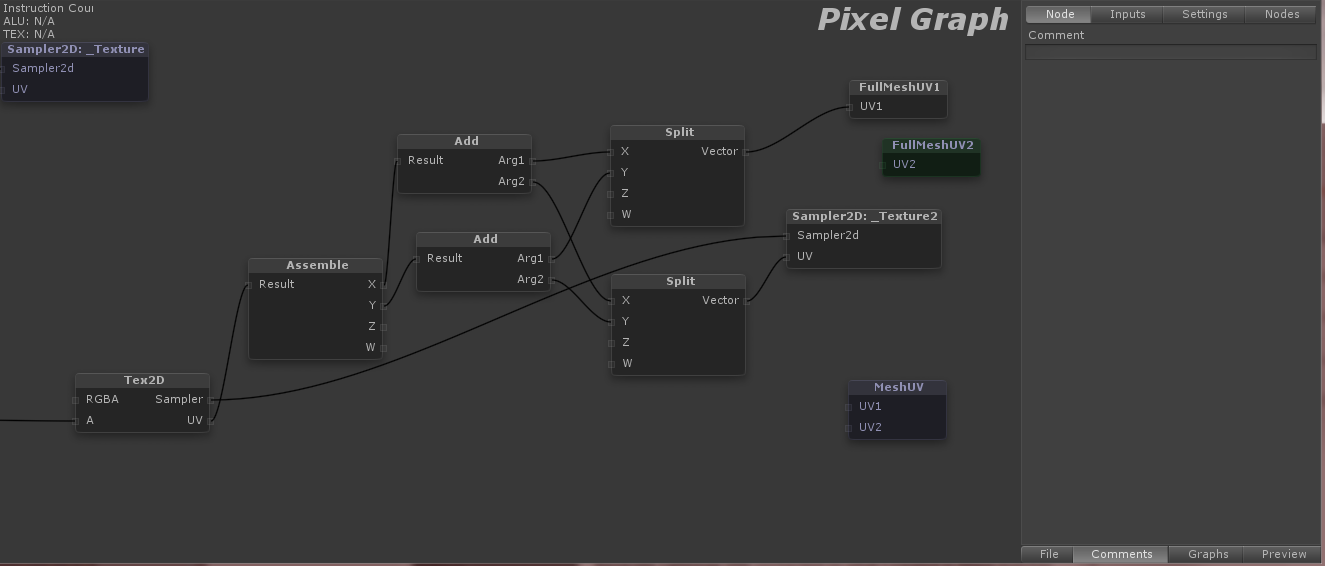
You'll want to use the FullMeshUV1 and 2 or the MeshUV nodes to access the two UV channels

I then use a Sampler2D to get the texture and its UVs. Now the next part is optional; If you want the texture channel controls that show up in the inspector to be operational, then we will need to combine the UVs from the texture and the mesh


Use split to breakdown the UV vector into it's X and Y channels.  Use the add to combine the texture UV channel and the mesh UV channel. Next, assemble merges these X/Y channels back into one vector.  Finally, you can attach that to a Tex2D node and use the RGBA from there.

In my example, I use the alpha channel from the second UV texture and UV mesh to mask out parts of the first UV layout.  Since my object is a sphere, the Y-axis projection on UV channel one serves as the base design while the second UV channel which was mapped out in a sawtooth pattern, allows you to use a simple gradient to mask out a ring-shaped section of the original texture.  Even better, you can now use the offset y on the second channel to animate the gradient up/down exposing different parts of the base texture!  Examples below.


Original texture with the Y-axis projection on UV channel 1


Second texture on UV channel 2.  This is actually just a straight horizontal gradient.


The combined effect of the two.  Now you can animate a ring emanating outwards or inwards with only one simple number: 2nd texture's y offset.


Friday, March 6, 2015

Ironman UI: Big updates with lots of new stuff!!!

I've got a bunch of new work to show for my Iron Man inspired music visualization HUD.  95% of the elements are place.  Here's a breakdown of what's new including a video showing everything in action.


Frequency meters now change in brightness based on their channel's amplitude.  Its much easier to see this animated, but here is a quick image showing what I mean.

Notice how the bands in the 300 range are brighter than the bands in the 100 or 600 range.  This is a nice indication of that the amplitude is greater for that particular frequency range.  You'll notice not all the bands are animating.  Right now I have each channel visualizing a different frequency range.  In a live setting with various microphones, the effect will look more like this.

This would be 8 frequency ranges per channel.

In the center, I've got a few standard equalizer bars.  Each one representing a different frequency range or microphone.


The outer ring that consists of many small slivers is a really cool part to all of this.  I wanted to take the traditional equalizer bar graphs that are typically associated with music visualizations and combine them with particle trails which are another common staple.  The beauty of particles and particle trails is that they show history.  As the particle ages, it fades away, changes color, flies off in some direction based on turbulence fields or some other particle system effector.  This outer ring combines both of these elements into one.
In this image, the light starts on the far left and moves in an arc to the right.  It's currently tied to highest frequency range so only high pitched singing or cymbal hits will affect it.  As the left side reacts to the music, each subsequent segment responds to the segment preceding it.  This sets up a really cool chain reaction where you can watch the history of high-pitched cymbal hits. It takes about 6 seconds before this history vanishes.  All of this is procedurally generated so you can control which objects get copied, how many, their overall position in the space, scale variation, color.....well the list goes on.  Here is close up of that arc band.

All of these different elements are actually constructed/scripted in such a way that they can be easily modified or made to look different from their original intentions.  I try to build in this flexibility so I can repurpose some parts in other visualizations or reuse them in this visualizatio.

To conclude all this, I've got a short video here.  Not sure why I'm on a jazz kick lately but the visuals are reacting to another composition I've started working on today.  Enjoy!


We're getting into the home stretch now.  I need to balance all of these elements a bit better, separate them some more on the Y-axis and get a background in place.  Also there is one big unifying piece that needs to be put into place.  Looking to wrap this up in the next week. Stay tuned...

Thursday, February 26, 2015

Iron Man UI: First video is up!

So I know its been a bit longer than expected since my last update but I finally have a video to show some work in progress!!!  Check it out here on Youtube:


There are a lot of things going on here and a lot that still needs work.  I'll go over a bunch of the parts right now.

Elements in place right now:
- 64 band frequency analyzer.  There are pics of this in my previous post.  8 different channels with each denoted by the 100 series numbers and each channel with 8 different frequency bands
- On the opposite side, there is a large meter and a colored triangle.  This represents the overall amplitude of all 8 channels combined.  The triangle gets brighter and goes from green to red based on the amp.
-  Moving towards the center, I'm still playing around with different concepts here.  I have three small rings that spin around when a large enough change happens on the amplitude.  Each ring represents a different frequency bin.  In this example, they are tied to the 3 highest bins, so only cymbal hits or high pitches will really cause them to light up and spin.
- There are three larger rings that don't spin but light up to varying degrees.  I'm not as keen on these right now.  They still need some work.  Here's a pic showing the two types of rings side-by-side

Finally, all meters have a brightness control that adjusts to the amplitude of its respective channel.  You can really see this effect at the beginning and end of the song.  Greater dynamic variation in the music will cause this to be more pronounced.  Live microphone audio usually helps too.

On top of all this, each element can be re-mapped on the fly to different frequency bins, or they can be driven by different microphone inputs.  Here's the control interface:
You can even have a particular element driven by multiple different frequency bins or microphone inputs.  The grid/board in my UI allows you to pick any input with a click of the corresponding square. You can add, subtract, and remap 8 audio inputs to 8 unique channels.

There's still a lot more to come.  All of these elements currently sit around the same space in the Y-axis.  They are offset a bit but there is much more to explore here.  Also, I need to get the central blocks moving and reacting to the music.  After all that is complete, we'll get a background in there and start moving this entire structure around.  Lots more to come.

Thursday, February 12, 2015

Iron Man UI: Panel outlines and different approaches

Creating the look of the various panels was the one of the first challenges I started looking into.  There a couple different approaches to this and some of my initial research led me here:

http://prideout.net/blog/?p=54
http://forum.unity3d.com/threads/cel-shading-w-edge-detection.253074/
http://willychyr.com/tag/edge-detection/

I wanted to give an extra special shout out to the work of
http://www.thomaseichhorn.de/npr-sketch-shader-vvvv/

All of this is really awesome stuff but there is one big limitation.  It requires a full screen processing effect to generate the lines.  I needed control of the lines on a per object basis.  Some objects would be different colors and the outlines would be varying degrees of thickness.  I also wanted control which edges would have an outline and which ones wouldn't.  After all this research, I decided to just go with texturing and using UV's to control which edges would have outlines.
Here is a pass of what this effect looks like.

These are shots of what it looks like in the game engine Unity.  A little bit of bloom effect is in place.  I can also change materials and make them opaque or transparent for different effects.


The next steps are to animate all these things and start playing around with how they react to music.  My next post will start looking at a structure I need to build for the animation and what parts should comprise that structure. 

Wednesday, February 11, 2015

New side project - Iron man UI visualization

So I've started a side project inspired by the Iron Man heads up display and UI designs.  This stuff looks great and a lot of amazing work went into creating these intricate pieces.  There are dozens of tutorials out on the web that show how to create your own Iron Man HUD and many of the people who worked on this in the movies have details on how some of the parts were designed.  Check out some of the links and videos below.  These have become basis for my work.

http://cgi.tutsplus.com/tutorials/iron-man-interface-radar-widget-parts-1-and-2--ae-21569


http://www.hudsandguis.com/home/2013/05/28/iron-man-3-hud-gfx-process-reel

Video demonstrating some of the processes from Iron Man 3:
http://vimeo.com/66944464

Really great breakdown of the process for creating the Iron Man HUD in Avengers:
http://jayse.tv/v2/?portfolio=hud

I haven't done this very often in the past so for this project, I'm going to document a vast majority of the steps and processes I use to create my music visualizations.  I hope you enjoy it!

Next steps will be breaking down the different elements, how they can apply to music, and what structures I can build to connect all these different elements.  Stay tuned for more.

Live Music Visuals: Galaxy v2.0 - Burning Bridges

Still working through Unity2019 and all the preview packages.  Trying to get some cool space stuff that reacts to music.  Second attempt h...