Showing posts with label music. Show all posts

Wednesday, April 1, 2015

Iron Man UI: complete!!!!!


The Iron Man UI inspired visualization is complete!  You can check out the complete video above which is accompanied by my latest single, Renewal, which is available on CDBaby, Amazon, and iTunes!

Now to talk about some of the movement of the visualization through space.  All of the different visual elements are linked to a master node which can move the complete structure through space.  You'll notice this motion occurs for the first time around the 0:30 mark.
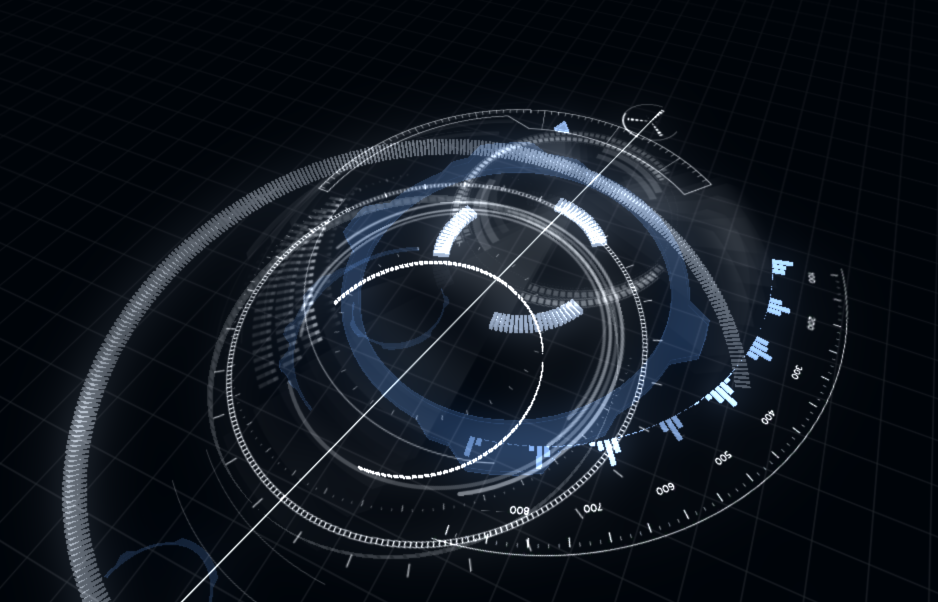

I put different dampening ratios on all the different parts so everything moves to a new location but not all at the same time.  This was mainly to create more visual interest in the movement.


You'll notice in the image above I've circled in red the two dials which control how or when a global motion will occur. This is one area I'm looking to explore much further in future visualizations but I'll describe that in just a bit.  For this, a threshold and timer determine when the entire structure moves and both of these variables are determined by audio parameters.  Putting controls in place allows you to override or help make this event happen to some extent. 

The image above shows the controls I've put in place for this visualization.  I've elected to keep them very simple on this one.  Some visualizations I create have very complex controls with lots of presets.  It often depends on the client and the performance as to how much flexibility they would like.  Here is an example of a more complex setup.
Each visual element I create often has numerous components that can be scripted to the UI control in Max/MSP.  I typically create presets which allow you to quickly move through lots of complex settings.  This is very similar to lighting and audio control boards you would find in live performance venues.  Technicians will dial in lighting and sound settings, create cues or presets, and build all of the events during rehearsals.  When the big performance happens, it's a much simpler process of moving through presets or cues at the correct timings.  My system mimics this procedure.  All of these controls/presets can also be further simplified for a mobile interface.  You can sit in the audience and run the entire visualization from your smartphone if you wanted to.

Back to the Iron Man UI controls, I have a hue shifter so you can shift the hue on all of the visuals from red to green or blue.  Bloom intensity lets you control how much bloom is applied.  There is a subtle adjustment on this which reacts to the amplitude of the audio.  This control allows for larger changes with the effect.  Height controls how much up and down motion the entire structure will move.  Setting this to 0 keeps everything at the default height.  Increasing this will expose the entire structure to an audio parameter which moves everything up or down.


As mentioned in previous postings, everything is driven by the audio.  The additional controls just allow for greater motions or an overarching control on some of these audio driven systems.  The computer handles all the minute analysis details and movement while you get to make the broad sweeping changes.

I noted earlier about future explorations in my visualizations and where I'm looking to go next.  Music has lots of patterns, themes, and motifs that often build on each other and develop.  I want to explore these further within the realm of video game combos.  Lots of video games utilize a system of combos.  Typically someone might button mash or go through a sequence of buttons a bunch of times to create a 25 hit combo for example in a fighting game.  RPG's, platformers, and other genres of video games have utilized similar concepts as well. Now what if musical structures could create their own combos within a music visualization system? That exploration could easily take another 2 years and another Master's degree to investigate.  In my next project, I'll at least begin to scratch the surface of combining those principals and we'll see what happens.

This is also my last time working with Unity 3.5.  Going forward, I will be migrating all work to Unity 5.0.  Stay tuned for the next visualization.  I also have some small tangential explorations from this visualization I'll post about too!  Can't wait to share my next developments.  For now, I hope you enjoyed this one.


Monday, March 30, 2015

Sunday, March 22, 2015

Iron Man UI: Almost there.... plus a new song called "Renewal"

It's been a couple weeks since I last posted anything about this project.  It's almost done.  I have a bunch of additions.  Last time I mentioned the need for one big unifying piece to help tie all the separate elements.  Here is a quick image of what that looks like:
This consists of a bulls eye element in the middle which can rotate independently from the rest of the parts.  Since there is so much other movement going on in the visualization, I elected to keep this element completely static.  To represent the music, it has a texture ring which emanates outwards exposing parts of the complete design.   The tutorial in my previous post demonstrates how to do this effect.

Finally, I added a few arcs that rise and sink around the central column.

There are a few more finishing touches like showing how this whole thing moves through space which I'll get to in my next post.

I got a bit side tracked because I had to compose a new piece of music for this animation. The piece of music is all finished and should go live later this week.  For now, you can check out a snippet of it in this video.  It's called "Renewal"


Much more awesomeness to come so stay tuned....

Monday, February 16, 2015

Iron Man UI: visualization structure - a fine balance

I want to start out with this really great clip and give a shout out to Stefan Surmabojov for putting together these awesome After Effects tutorials.  These have been invaluable in helping deconstruct this work and helping me formulate a system that will work to visualize music in this type of thematic style. 

http://cgi.tutsplus.com/tutorials/iron-man-interface-battle-widget-parts-3-4-and-5--ae-21545

What's great about the video above is that you can see all the unique parts that make up this HUD.   There is often a fine balance that I have to strike when building music visualizations.  I strive to have everything or as many elements as possible react to the audio.  Some visuals react more abruptly while others may react more subtly.  The goal being that the sum of all the parts will unite and create one awesome looking visualization!  You may not notice the fine details on all the different parts, but for me, that just gives the visualization more depth.  When someone watches it again some day, they may notice something new or some other element reacting to the music they hadn't seen before.  A good painting can draw you into a new world and keep you exploring and discovering new parts or details in the background.  I'm striving for that very same goal in my music visualizations.  The challenge is to strike a balance between all of these elements to make sure I don't just create visual noise or overload the viewer with too many different components competing for the viewer's attention.  

I haven't finalized my structural intent, but I have begun to narrow down some thoughts including using rings stacked on top of each other similar to how all the Iron Man HUD components stack on top of each other to create depth for a 3D effect.  Larger panels/elements will react to lower frequencies while finer, more intricate components will react to higher frequencies.  One element I really liked was the outward projecting meters indicated here:
I've started my own pass on these here although they are bit larger.  There are 64 bands/meters currently in my version.  8 audio channels and 8 frequency bins per channel.  I've got a couple screen shots from Unity below. 


I will probably bring these in closer to the center stack indicated by the other rings in the lower left corners of the images.   I'll try to get some early videos of how all this looks in the next day or two.

I've got a sketch of some ideas I've started playing around with including how the entire stack will move.  I'll go into a bit more of this concept in a later posting but there is a cool way to build a visualization and then use a global movement on all the parts to indicate large changes in music.  These changes can be themes, motifs, the chorus or refrain in a song for example.  More to come on all this soon!

Wednesday, February 11, 2015

New side project - Iron man UI visualization

So I've started a side project inspired by the Iron Man heads up display and UI designs.  This stuff looks great and a lot of amazing work went into creating these intricate pieces.  There are dozens of tutorials out on the web that show how to create your own Iron Man HUD and many of the people who worked on this in the movies have details on how some of the parts were designed.  Check out some of the links and videos below.  These have become basis for my work.

http://cgi.tutsplus.com/tutorials/iron-man-interface-radar-widget-parts-1-and-2--ae-21569


http://www.hudsandguis.com/home/2013/05/28/iron-man-3-hud-gfx-process-reel

Video demonstrating some of the processes from Iron Man 3:
http://vimeo.com/66944464

Really great breakdown of the process for creating the Iron Man HUD in Avengers:
http://jayse.tv/v2/?portfolio=hud

I haven't done this very often in the past so for this project, I'm going to document a vast majority of the steps and processes I use to create my music visualizations.  I hope you enjoy it!

Next steps will be breaking down the different elements, how they can apply to music, and what structures I can build to connect all these different elements.  Stay tuned for more.

Live Music Visuals: Galaxy v2.0 - Burning Bridges

Still working through Unity2019 and all the preview packages.  Trying to get some cool space stuff that reacts to music.  Second attempt h...